
ScalePods
September 8, 2026AI Automation

The Future of Workflows: Why AI Automation Sets the Standard in 2026

How connected systems replaced manual admin work — and why sitting this one out is turning into a real operational risk.
The Future of Workflows: Why AI Automation Sets the Standard in 2026

From Spreadsheets to Systems That Run Themselves

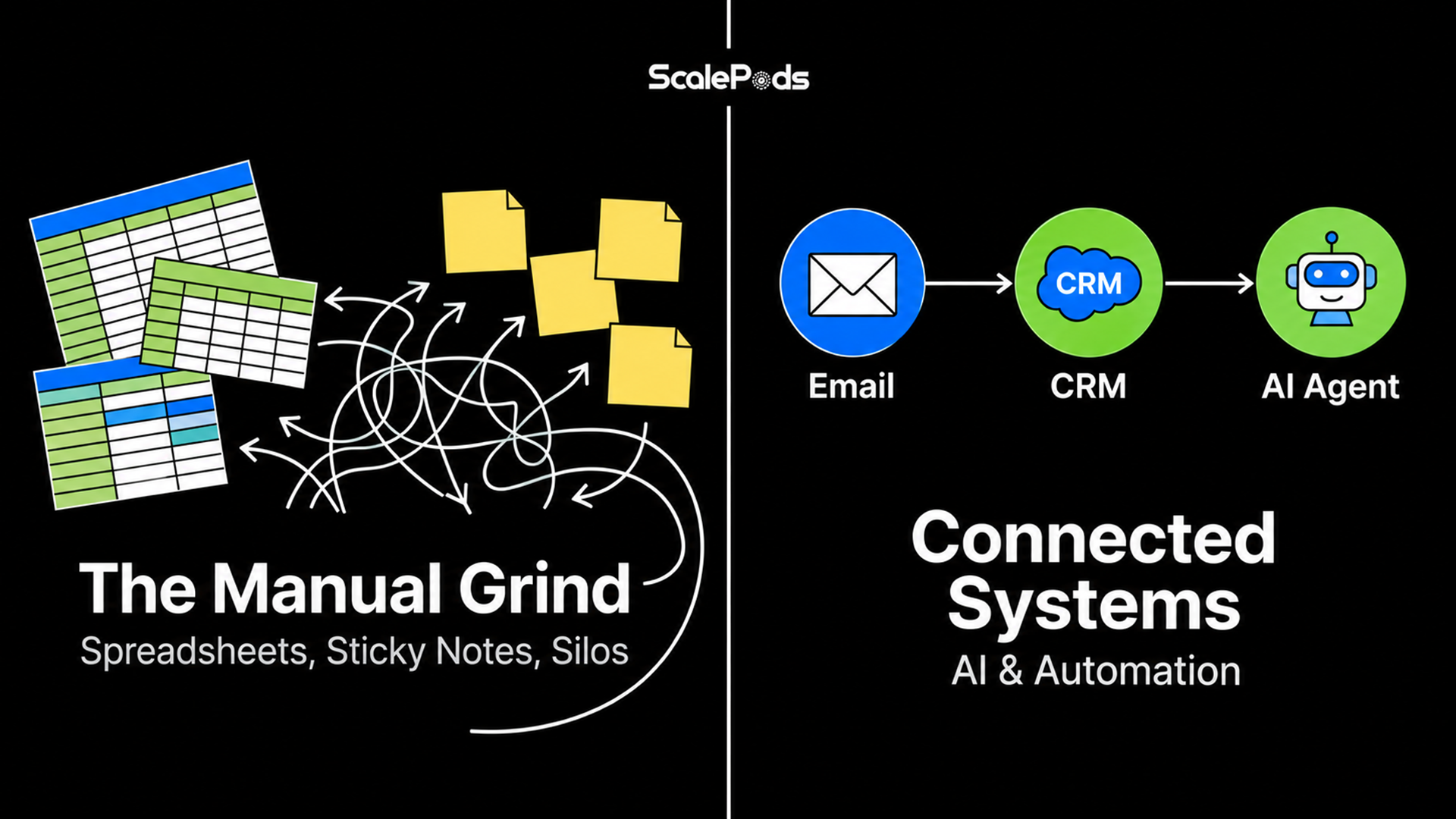
Think back to a workday from just a few years ago. There was probably a shared spreadsheet nobody fully trusted, a sticky note reminding you to follow up with someone, and a chunk of your Friday spent chasing colleagues for a sign-off that should have taken five minutes. Miss one email in that chain, and the whole thing stalled.

That version of work is mostly gone by 2026 — not because someone found a clever workaround, but because tools like Zapier, Make, n8n, and custom AI agents now do the connecting themselves. Your inbox talks to your CRM. Your web forms talk to your task board. Whether you're routing a new lead, scheduling a month of content, or getting a client set up, most of the tedious back-and-forth happens without anyone touching it.

This stopped being a startup novelty a while ago. It's just how competitive teams run things now.
From Spreadsheets to Systems That Run Themselves

What the 2026 Numbers Actually Show

You don't have to take that on faith — the benchmark data backs it up. Here's roughly where adoption and impact stood in 2026:

Companies running automation in at least one operational unit: 66% (up from 57% year-over-year) — McKinsey
Large enterprises deploying some form of automated workflows: 84% — Industry Benchmark Data
Overall valuation of the workflow automation market: ~$26–28 billion (on pace to clear $40B+ by 2031) — Mordor Intelligence
Estimated global economic value unlocked each year via AI systems: $2.6–$4.4 trillion — McKinsey
Average first-year drop in operating costs for automated companies: ~35% — Industry Benchmarks
Tracked 3-year return on investment (ROI) across automation programs: 248% — Forrester
Portion of the typical workweek still drained by manual copy-paste tasks: ~25% — Smartsheet
Organizations operating fully hands-free, autonomous workflows: Only 4% — Industry Research

Sit with those numbers for a second and two things jump out:
Automation isn't optional anymore. Most companies have already wired basic automations into their day-to-day operations — this part of the race is essentially over.
Actually finishing the job is still rare. Plenty of teams have dabbled, but only a small slice have stitched everything into a clean, touchless loop. That gap between "tried it" and "built it properly" is exactly where a team can still get ahead right now.
What the 2026 Numbers Actually Show

Smarter Systems, Not Just Faster Ones

Early automation tools were fragile. If condition A happened, do B — and the moment a customer typed something the script didn't expect, everything broke. What's changed is that AI-driven workflows can actually make sense of nuance instead of just matching patterns.

Take a stack of 150 survey responses. An intern used to spend an afternoon reading through those by hand. Now a model groups the feedback by theme, flags the complaints that need attention, and hands you a summary in about the time it takes to get coffee.

Or take lead sorting. Instead of a clunky dropdown deciding how "qualified" someone is, the system reads what the prospect actually wrote and shapes the first follow-up email around it, without anyone touching it.

The point isn't just that keystrokes disappear. It's that judgment calls which used to require a person now happen at a volume no team could realistically keep up with by hand.

What This Looks Like Day to Day

Customer Support: Incoming tickets get scanned for tone and urgency before anyone's even logged in for the morning.
Sales Pipelines: Leads get scored on actual buying intent and company fit — not just which box someone checked on a form.
Content Hubs: One brief turns into a blog draft, a set of social captions, and an email sequence, all in a single pass.

Humans Still Run the Show — They Just Do Less of the Grunt Work

These systems don't clock out at 5 PM. Someone emails at 2 AM, and by the time your team logs on, the system has already drafted a reply, logged the contact in the CRM, and queued a follow-up task.

That doesn't mean people are out of the loop. You'll still want a human reviewing a high-value contract, a sensitive message, or anything genuinely unusual. What's different is that the system no longer sits idle waiting for someone to hit "start." Automation used to assist a process a person ran end to end. Now it runs the process, and people step in specifically where judgment actually matters.
Humans Still Run the Show — They Just Do Less of the Grunt Work

Integration Is Your Real Infrastructure

A workflow that only lives inside one app isn't really a workflow — it's a feature. Teams that get real value out of this connect their intake forms, project boards, knowledge bases, and messaging tools into one pipeline, with automation and AI agents acting as the glue: moving data between apps, kicking off the next step, closing loops without anyone forwarding an email to remind someone.

That's also why integration matters more than any individual tool on your invoice. A great CRM that doesn't talk to your inbox is still a silo — just a more expensive one. The real leverage comes from how well your apps talk to each other, not from how many of them you're paying for.

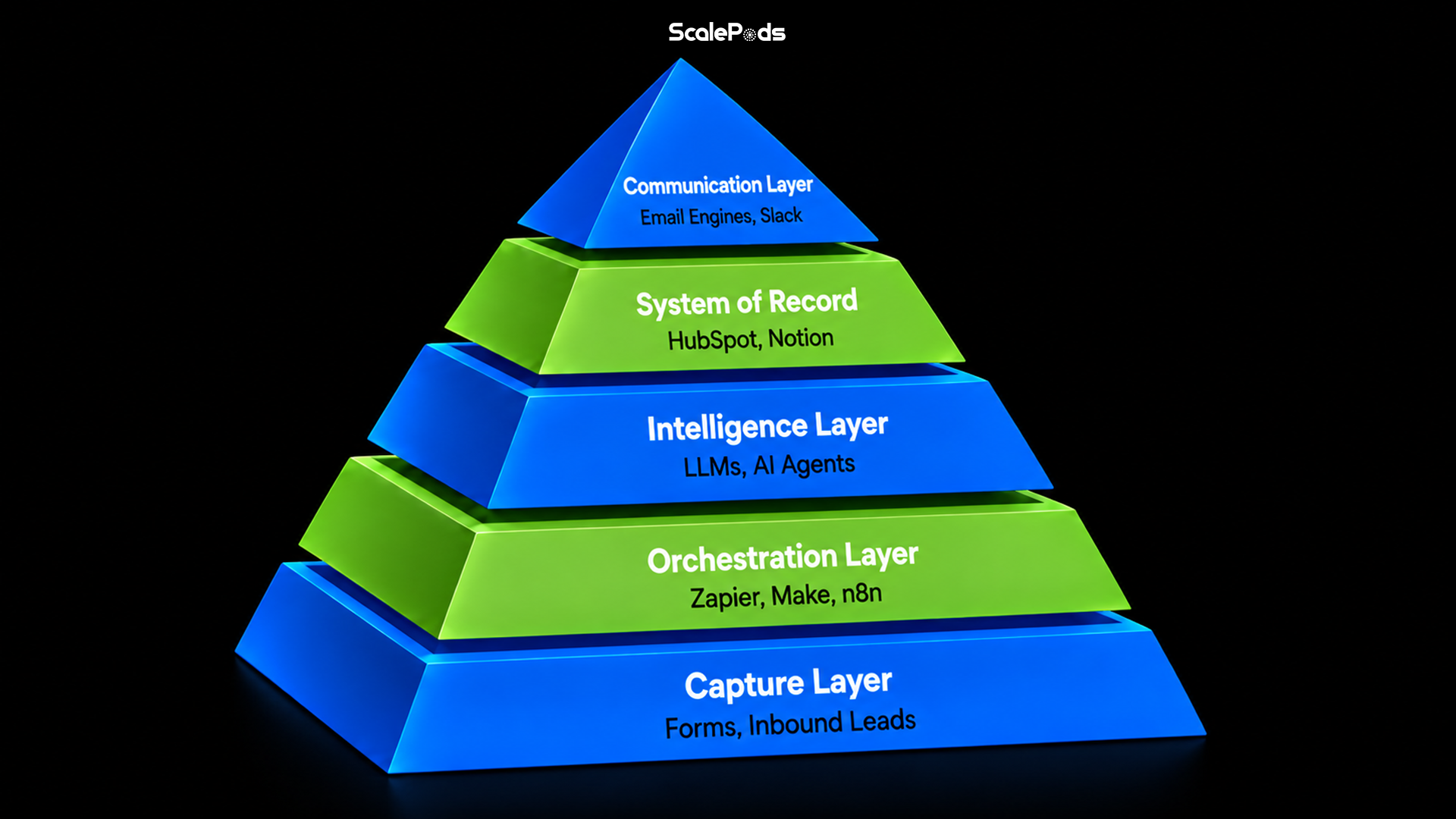
The Connected Tech Stack in 2026

Capture Layer — Tally, Typeform, Web Forms: Gathers raw leads, support requests, and user feedback
Orchestration Layer — Zapier, Make, n8n: Routes payloads and triggers multi-app automations
Intelligence Layer — LLMs, Custom AI Agents: Parses context, drafts content, and handles classification
System of Record — HubSpot, Salesforce, Notion, Airtable: Stores, cleans, and organizes the final business data
Communication Layer — Email Engines, Slack, WhatsApp: Pushes alerts and messages out to the right people immediately

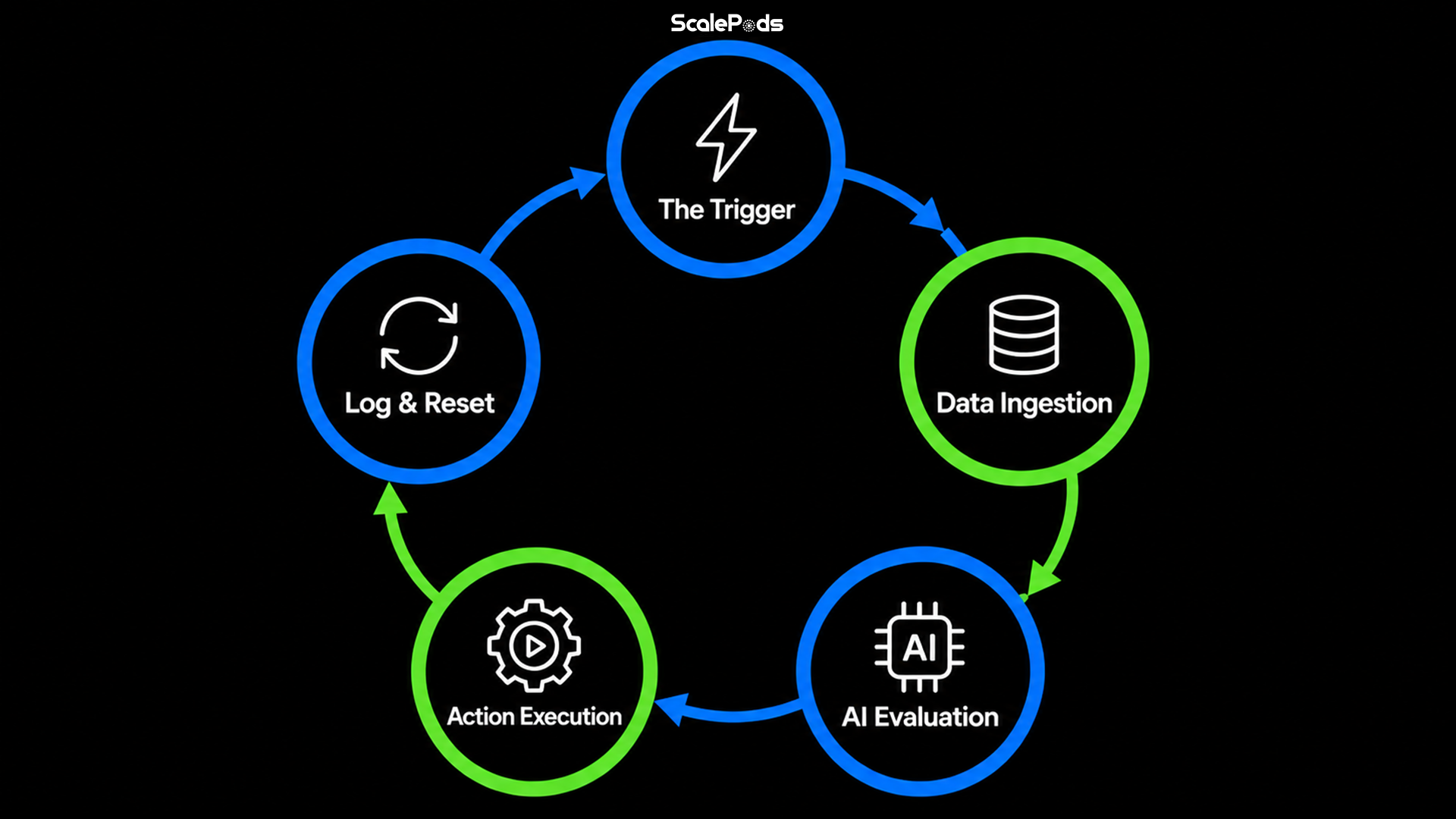
The Five-Stage Loop Behind Every Reliable Workflow

Nearly every automated workflow that actually holds up under real use runs through the same basic cycle, resetting itself once it's done:

The Trigger: A form submission, new support ticket, incoming email, or scheduled timer fires.
Data Ingestion: The system pulls in the incoming payload and cleans up the fields automatically.
AI Evaluation: A model reads the context — classifying intent, scoring priority, or drafting something.
Action Execution: Integration pipelines trigger the downstream steps, like pinging a Slack channel, creating a CRM deal, or sending an email.
Log & Reset: Everything gets archived to your main database, and the system resets itself for the next trigger.

This loop replaces the old routine of noticing a problem, trying to remember it later, and eventually getting around to fixing it by hand — usually after it's already caused a mess.
The Five-Stage Loop Behind Every Reliable Workflow

How Different Departments Are Actually Using This

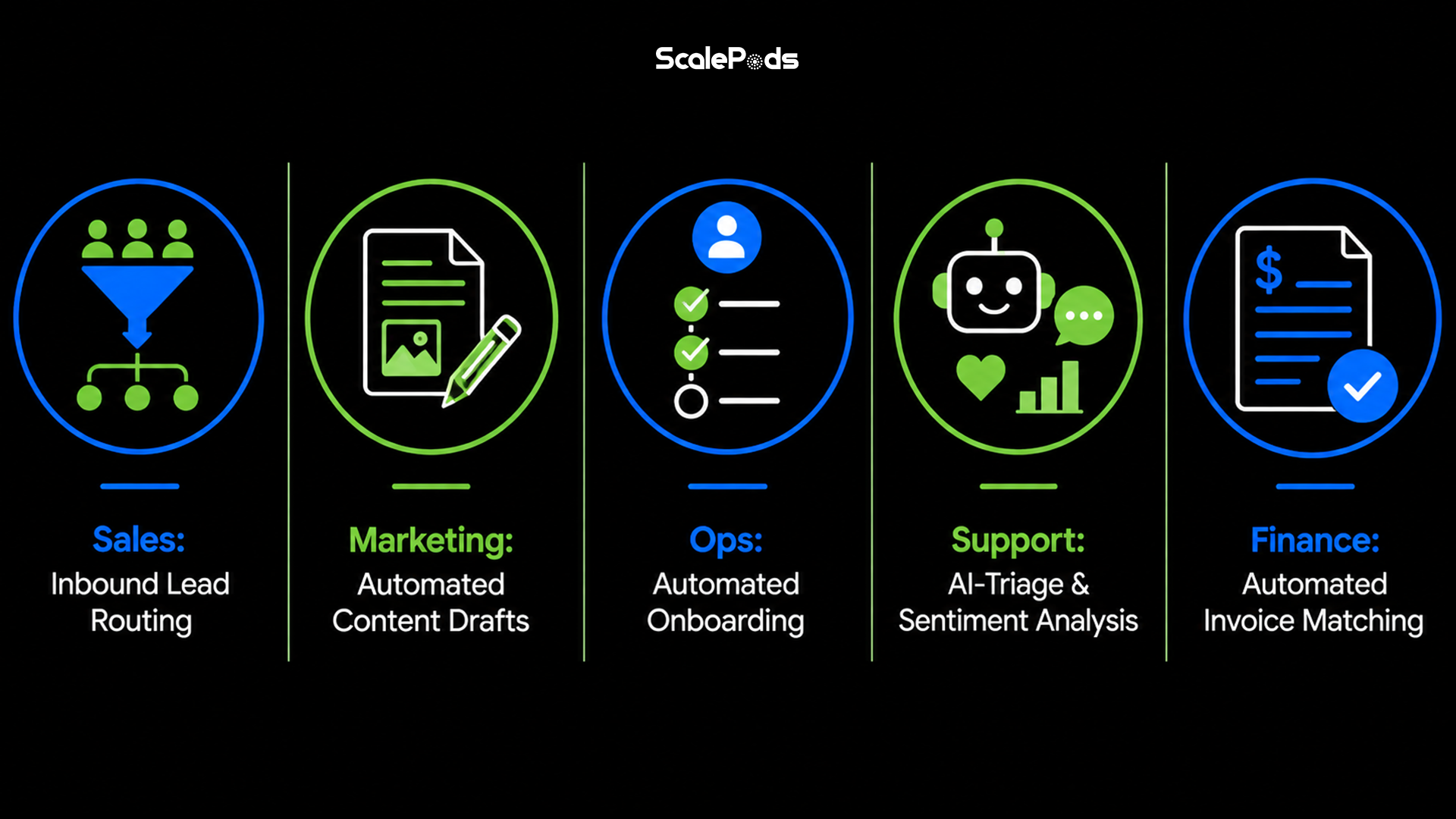
Sales Teams: Inbound leads get scored, enriched with company data, and routed to the right rep instantly — often with a tailored first message going out before a rep even opens their dashboard.
Marketing Teams: First drafts of blog posts, social captions, and nurture emails come out of a single brief, leaving writers to polish rather than stare at a blank page.
Operations & Fulfillment: The moment a client signs, onboarding agreements, calendar links, project workspaces, and welcome packages get generated automatically.
Customer Support: Routine questions get answered instantly by trained models, while messy or sensitive complaints get flagged and routed straight to a specialist.
Finance & Accounting: Invoices get scanned, coded, and matched against purchase orders on their own, with only the odd discrepancy kicked back for a human to look at.

Getting Started Without a Big Budget

You don't need a massive budget or an in-house engineering team to get moving on this. The teams that pull ahead usually just pick one painful bottleneck, prove it works, and expand from there.

Document what you actually do: Map out every click and handoff in a task your team repeats weekly.
Spot the rote steps: Look for the repetitive, rules-heavy parts where human judgment isn't really needed.
Pick your orchestration tool: Start with a no-code option like Zapier or Make for standard flows, or look at n8n if you need custom logic.
Add AI where context matters: Bring in an LLM for summarizing, classifying tickets, or drafting personalized messages.
Wire it into your main workspace: Make sure the outputs land directly in the CRM or tools your team already lives in.
Run it in parallel first: Let the automation run alongside your manual process for a week so you catch the edge cases before you rely on it.
Revisit it monthly: As the business changes, check back in and tweak prompts and integrations rather than leaving it on autopilot.

Mistakes Worth Avoiding

Automating a broken process: Automating something inefficient just produces bad outcomes faster. Fix the process first, then automate it.
Skipping checkpoints on high-stakes items: Keep a human review step anywhere contracts, large refunds, or high-touch clients are involved.
Tool sprawl without connectivity: Five great tools that don't talk to each other just means five new manual steps. Integration isn't optional.
Set it and forget it: The rare companies running truly touchless systems got there by auditing and refining constantly — not by building it once and walking away.

The New Baseline

AI automation isn't some futuristic extra anymore — it's standard operating procedure, from solo agencies up to large enterprise teams. The businesses pulling ahead in 2026 aren't the ones with the most software subscriptions. They're the ones whose systems actually talk to each other and keep running without someone watching over them.

Handling routine work entirely by hand isn't the careful choice anymore. It's the slow one. Real productivity was never about typing faster — it's about building something that doesn't need you to babysit it.

ScalePods

Build an Automated Engine That Works Around the Clock

Smarter workflows. Faster responses. Automated systems that handle the busywork so your team can get back to real growth.

Frequently Asked Questions

Not really. Enterprise adoption is high (around 84%), but small and mid-sized businesses are catching up fast — jumping from roughly 22% to 38% in recent years as smaller teams look to cut costs and respond to customers faster.
AI Workflow Automation: The Future of Workflows in 2026